BrowserPilot Add to Chrome
Free Chrome extension · AI browser automation

Let AI use your real Chrome

BrowserPilot lets Claude Code, Cursor, Codex or any MCP agent click, type, fill in forms and read pages in your own signed-in browser, while an animated cursor shows you every step.

  • Claude Code
  • Claude Desktop
  • Cursor
  • Windsurf
  • Codex CLI
  • Gemini CLI
  • VS Code
  • Any MCP client

An animated preview of a run. Watch the real recording

Watch a real run

36 seconds with voice-over, recorded with BrowserPilot's own screen recorder: Claude Code books the cheapest flight on a sample travel site.

Connect any AI in one paste

No accounts, no API keys, no separate browser. The AI works where your logins, cookies and tabs already are.

  1. Copy the AI prompt

    Click the BrowserPilot icon in Chrome and press Copy AI prompt. It holds everything your AI needs.

  2. Paste it with your task

    Paste it into Claude Code, Cursor, Codex or any agent and add what you want done. The AI connects by itself.

  3. Watch it work

    An animated cursor clicks and types in your browser. Press Stop or Alt+Shift+P to take over at any time.

Everything an AI needs in a browser

Real mouse and keyboard input, compact page reading and the hard parts handled, as native tools for your AI.

Real clicks and typing

Click, type, press shortcuts, scroll, hover, drag and drop, and fill whole forms in one step, through Chrome's own input layer.

Reads pages, saves tokens

A compact outline of the page with element references, page text and screenshots with labels, and only what changed since the last look.

Uploads without the file dialog

File inputs, upload buttons and drop areas, from paths on your computer, URLs or content the AI writes.

Dialogs and hard pages

"Leave site?" and other dialogs, permission prompts, iframes, shadow DOM, Google Docs and Sheets, Notion, Canva and code editors.

Test your app and its API

Full network traffic, endpoints, access tokens with JWT expiry, request replay, curl commands and HTTP requests with your signed-in session.

Many profiles and tabs

Open a profile by name or email, work in several at once, and keep each task's tabs in their own tab group.

Watch every step. Stop it any time.

Every page the AI uses shows its cursor with its name, a live status line that says what it is doing, and a Stop button.

  • A badge on the tab icon marks the tab the AI works in
  • Pause all AI control with one click or Alt+Shift+P
  • Choose which Chrome profiles an AI may use
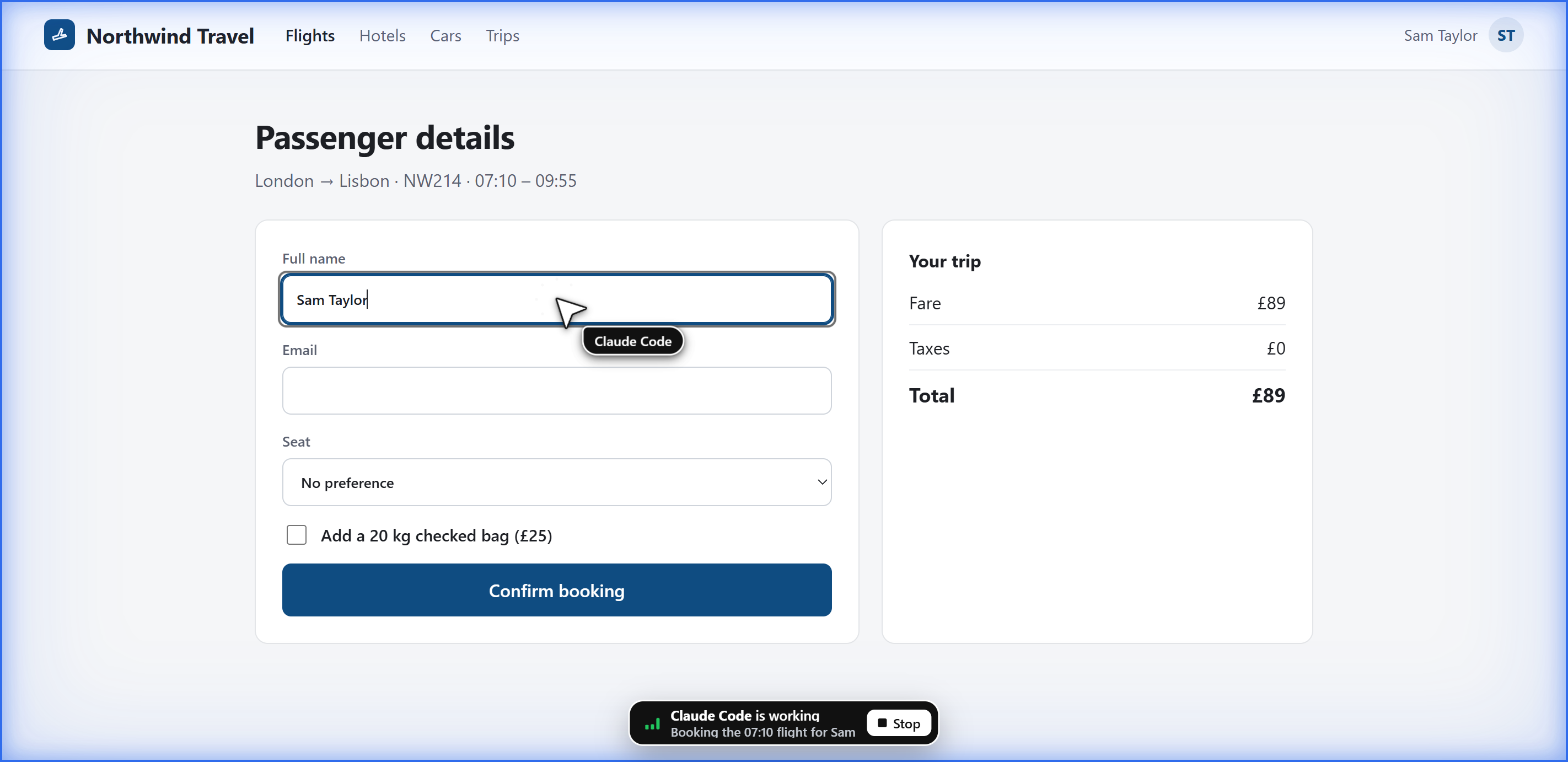
BrowserPilot's AI cursor, labelled Claude Code, typing a passenger name into a booking form, with a status line and a Stop button

Show a task once. AI repeats it.

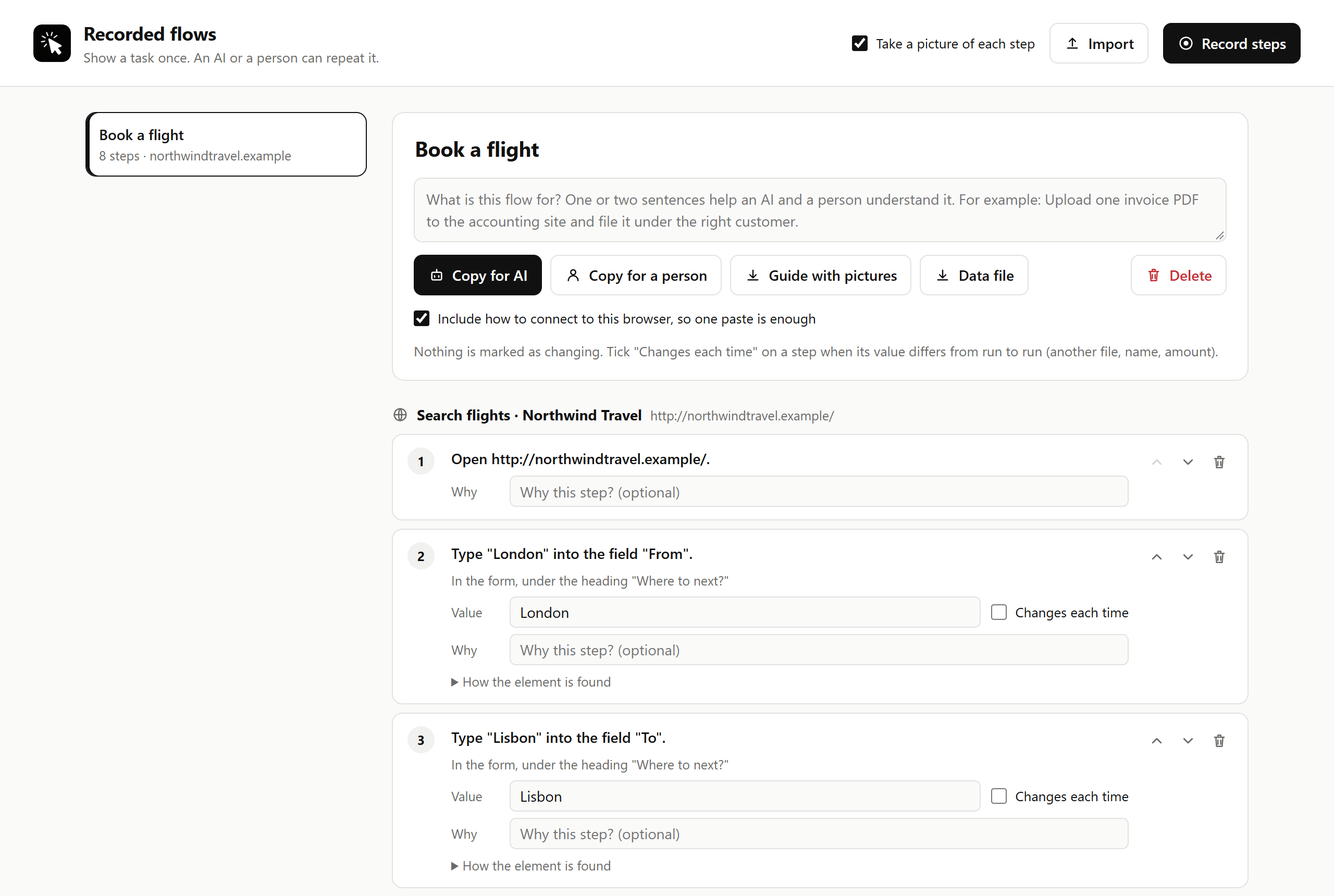
Record your own steps in Chrome. BrowserPilot writes them up with the page, the section and the element of each step, ready for an AI to repeat with new data.

  • Mark values that change each time, such as names or files
  • Copy the flow for an AI, or export a guide with pictures for a person
The Recorded flows page listing the steps of a flight booking, with Copy for AI and Guide with pictures buttons

Record demo videos at any screen size

The built-in screen recorder saves an MP4 of a tab as a desktop, laptop, tablet or phone, with or without a browser or device frame.

  • A cursor that moves like a hand, or touch taps on a phone
  • Zoom on clicks, captions and title cards
  • A whole scripted demo in one AI call
  • Record yourself from the popup, your mouse drawn in

Private by design

BrowserPilot has no servers and no account. The extension talks only to a small bridge program on your own computer that your AI starts with one command.

  • Page content goes only to the AI tool you connect
  • Every cookie and full network traffic stay off until you switch them on
  • Remote access is off by default, and protected by a private token when on
  • Nothing is sold, shared or used for advertising

Read the privacy policy

Questions

What is BrowserPilot?

BrowserPilot is a free Chrome extension that lets an AI agent such as Claude Code, Cursor or any MCP client use your real Chrome browser: open pages, click, type, fill in forms, upload files and read content, while an animated cursor shows you every step.

Which AI tools work with BrowserPilot?

Claude Code, Claude Desktop, Cursor, Windsurf, Codex CLI, Gemini CLI, VS Code with Copilot agent mode, and any client that supports the Model Context Protocol (MCP). There is also a REST API and a command line, so any script or agent can use it.

Is BrowserPilot free?

Yes. BrowserPilot is free and needs no account or API key.

Does my data leave my computer?

BrowserPilot has no servers. The extension talks only to a small bridge program on your own computer. Page content goes only to the AI tool you connect, the same as anything else you share with that AI.

How is it different from Playwright, Puppeteer or a headless browser?

Those start a separate, empty browser. BrowserPilot works in the Chrome you already use, with your logins, cookies, extensions and open tabs, and shows the AI's work live so you can stop it at any moment.

Does it work in Edge, Brave or Vivaldi?

Yes. BrowserPilot works in Google Chrome, Microsoft Edge, Brave, Vivaldi and other Chromium browsers on Windows, macOS and Linux.

Can I record a video of the AI's work?

Yes. The built-in screen recorder saves an MP4 of a tab at desktop, laptop, tablet or phone size, with a human-like cursor, zoom on clicks, captions and title cards. You can record yourself from the BrowserPilot popup, or let the AI record a whole scripted run in one call.

What do I need to install?

Only the extension. The AI starts BrowserPilot's small bridge program with one command from the copied prompt; it needs Node.js 18 or newer, which most developer machines already have.

Give your AI a browser it can use

Install BrowserPilot, copy one prompt, and watch your AI work in Chrome.